Showing posts with label google adwords. Show all posts

Sunday, February 16, 2014

Fighting the Secure Search Battle

Digital marketers have become accustomed to no longer being able to receive complete search term data. Google became the first to secure their search data with their announcement that all signed-in users would be secured in October of 2011. Now more than two years later, Yahoo has announced that they will follow Google’s lead and make Yahoo searches secure, causing digital marketers to once again scramble for ways to gain access to their keywords.   


The Google empire completed the full transition in September of 2013 as they confirmed that all searches would be secure by default.  What this means is that instead of seeing the individual keyword or searched term in your analytics tool, you will see the phrase “not provided.”  Marketers will know that a search happened but be unaware of the exact term used to bring the visitor to the site.

No Referrer with Yahoo

Yahoo is planning to fully shift to secure searches by March 31st, 2014. Like Google, all searches will be done through a secure server.  Unlike Google, there will be no “not provided” term in your analytics. Yahoo will not be sharing any information at all.  All data driven from Yahoo will appear as though the visitor came directly to the site. The No Referrer policy will make it difficult for the analysts and digital marketer to differentiate between a Yahoo search and a direct visit.

Optional Secure Search at Bing

Bing continues to be that friend not willing to rock the boat. Bing still wants your friendship.  In January, Bing officially launched secure search though it has been turned off by default.  Digital marketers will continue to receive their Bing keywords for the time being.

If or when the user decides to turn on secure search with Bing, the data will appear similar to Yahoo's with a No Referrer policy. 

Tips on How to Fight the Secure Search Battle 
  1.  Use Bing.  Even though Bing may only represent a small portion of your organic search volume, it can provide insight into visitor behavior and give you search term data.
  2. Google Analytics may not provide specific keyword info, but Google Webmaster tools may still provide what you need.  Experiment with the Search Queries report and you may be pleasantly surprised with what you find!
  3. Use Google Adwords. Though Google claims that it has transitioned to secure search for security purposes, the keyword data can still be bought through Google Adwords.
  4. Use site searches to understand what users are searching for on your site. You can receive valuable insights on potential keywords by tracking what users are searching for within your site.
  5. Don’t worry and be patient. Mastermind search marketers will find ways to get our keywords back. Continue to stay updated with industry news and notes as valuable information is released and tools are developed.

Monday, May 6, 2013

How should Google Instant change your next campaign?


Probably, but not how you might have expected.

For those of you who don’t use Google as your default search engine...Click Here
Anyway, Google Chrome instant search is a real-time search tool that allows users to more rapidly search for things on the internet . Extremely convenient, as you can see below, the search uses algorithms to auto predict your search results based upon
the most commonly typed in phrases or words. In fact, Google states that it can save 2-5 seconds for every search on Google. For me, someone who has more than 200 searches a day (i know, i have counted), that is a substantial amount of time. Here is a cool link that shows how the search works.


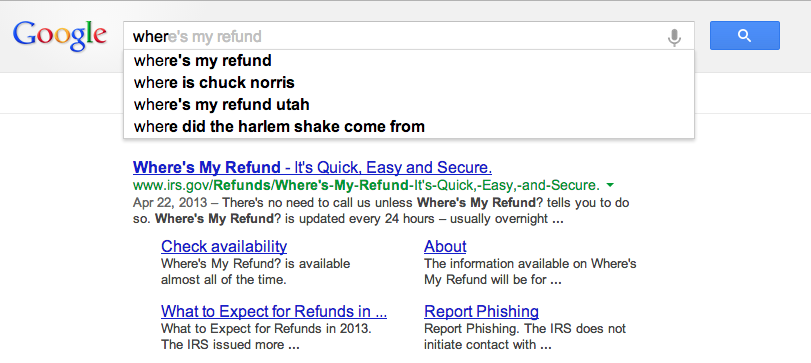
In the search below i just typed in the query ‘wher’ and this is what is returned:


Because it is in grey in the search box, the search results will have ready been presented in the window below:


It is May 6, when i am writing this so you can see why the “Where’s my refund check,” may be the most frequently searched phrase. Popularity, within context, is one of the main reasons for the higher results, but Google asserts that all suggested results, impressions, are based upon ‘real-user searches.’ But i didn’t want to search for “Where’s my refund check,” but rather “where to buy Lime Green Jackets?” So did i just give an impression for “where’s my refund check?”


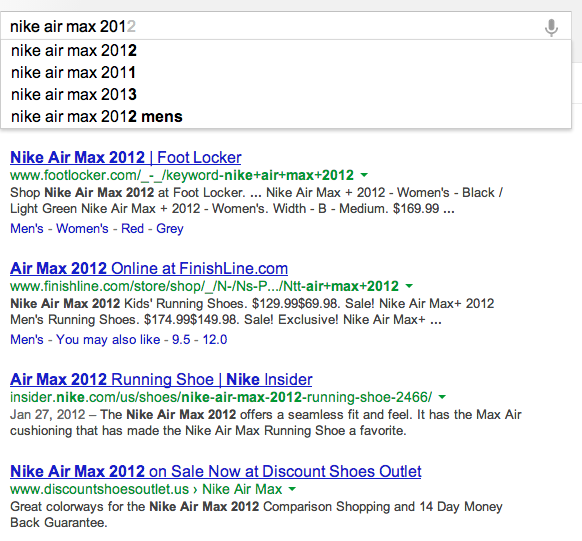
While a great example of instant searches,  let’s take another example of an instant product search. If you open up your browser to google.com and type in the “Nike air max 201” you will see a suggested list like 2013 and 2012, but what is really interesting are the results that are presented below. Remember, we haven’t hit enter yet, but our results are still being displayed. If you drop select the “2012” in the suggested list, you should get a result list like this:
Any results that lists Nike in the domain is third in our organic searches list. Now instead of selecting the “2012” result in the search bar, select the “2013” and watch how your results differ. Now we see “nike” domain in the top slot. Is Nike paying extra for the keyword “2013” or is google instant search playing with things? If we just search for “nike air max”, Nike is the top two results. It is noteworthy, that is your were searching specifically for 2013 Nike Air Max shoes, you would have seen the results for the 2012 shoes first. Is this an incorrect impression?


After researching several sites, including Google, it is said the Google Instant will NOT be affecting your PPC data or your analytics data. Impressions, for instances, are only counted when a search term is clicked, the greyed suggested term is selected with an ‘enter’, or if you stop typing on a search query for more than three seconds. Google also believes, naturally, that instant search should actaully improve your impressions data over time because it will lead to less incorrect search or impressions, as users will see the results beforehand and be able to adjust their search terms appropriately. 

Seems like a reasonable way to ensure quality impression data, but where things may see a difference is in the AdWord campaign that you may be using. Google admits that your AdWord campaigns will need a tweak from your original campaign purchases. One thing that is always a question, is do you buy “hotel” or “hotels”? Before, you may have wanted to purchase “hotel” as it was shorter, but now it seems like Google Instant prefers “hotels” over “hotel” in the suggested 
results.
What is strange is that Google Trends shows that “hotel” is a much more frequently searched term than “hotels”.

So it would seem it is hard to pinpoint exactly which AdWord term would be a better fit. Of course, if you have the funds, you could always purchase both.


Throughout my research on this topic, the article by David Iwanow, on SearchEngineJournal.com was by far the most thorough. If you plan on reading more on this topic I highly recommend it. Link

So how does this change the way you prepare for your next campaign?


Sunday, May 5, 2013

CPC - Adwords Phone Conversion Tracking


Analytics is becoming more and more important across all industries. In many cases the use of analytics is what makes you better than your competition. Most of my experience with digital analytics comes from working with eCommerce stores using the popular Google Analytics. Within Google Analytics you have a plethora of tools at your disposal. You can segment your traffic and see how each area is performing or you can create custom reports to see the effects of your SEO efforts. One of the awesome areas of Google Analytics is to see your CPC and CPM costs and revenue.

               
 I would like to focus a bit on how CPC and CPM models work. In general, a CPC is when a customer sees one of your ads/banners and clicks on it. When that happens you are charged a fee for that click. That fee in most cases was decided with your bidding and in the auction process of listing your ad. In a CPM model you pay for the view of the ad whether or not they click on it. This is called an impression. After the customer comes to your site you then are able to track them all the way till they leave of the transaction is complete. Seems fine right? Well consider this example. Customer “A” clicks your ad and you are charged $1. Customer A continues browsing the website and decides to make a purchase. He adds the product to cart and checks out. We now see in our analytics that we had 1 visit, 1 conversion, and spent $1 on advertising. Customer “B” sees the same ad and clicks on it. We are again charged another fee but this time is was only $0.75. Customer B continues to browse the site and finally decides on an item he wants to purchase. However before making the purchase he wanted to ask the company a few questions about the product. He calls their 1-800 number, gets his questions answered, then when asked by the store associate if he would like him to place his order for him over the phone he answers yes. Well now when we look at our analytics tracking we see 2 visits, 1 conversion, and $1.75 spent on advertising. Do you see the problem? Because customer “B” ended up placing his order over the phone we were not able to record the transaction in our analytics.

                The scenario above is a very common problem with most companies with online sales. Many don’t even know this is a problem.  We have spent days searching for the best solutions. Let me share a personal experience with this problem. At my work we were in dire need of a marketing manager to help manage our CPC and other marketing avenues. We decided on a recent grad to take over our marketing and he began revamping all our campaigns. He would look at some campaigns in Google Analytic and noticed many where we were spending over $300 a day and only had one or two conversion during the day. Seeing this he immediately stopped all campaigns that fit into this scenario. The next day we noticed that our sales were significantly lower. We figured it must have been just one of those days. The second day was the same. We then went into panic mode and revisited our Google Analytics and everything looked fine. The only area that significantly changes was our call traffic/revenue. After further digging we realized what this new marketer did and enabled the campaigns that he had disabled. Most of these campaigns were for $2000+ priced products and our customers preferred to call in first before placing their order.  Being able to accurately track your advertising costs and success is crucial to be successful in a competitive marketplace. In our industry anyone can open shop in their garage and begin selling products at a fraction of the cost. But because they have no expertise with CPC and accurately using analytics they quickly burn out of cash and go out of business.

                Many sources (Blue Corona) state that CPC and other paid forms of traffic generate 12 times the amount of phone leads compared to natural organic traffic. In our case we have found it to be around 7 times greater than organic leads. To help with phone tracking there are a few solutions to help mitigate the lack of data tracking in this area. Some are better than others.

1.                One partial solution is to have each customer service rep ask the customer how they found out about the company, then mark the source of the order in the company’s internal system. This is the cheapest way to get a basic idea of where the majority of your phone calls come from. However how many people know where or not they click on one of our CPC ads? In most cases they won’t know and just say they found you on Google. For some business this may be an ok solution especially when you can determine phone leads from different avenues. This would help know what people searched for you online compared to calling from a phone book. When creating your reports from Google Analytics or what every analytics solution you use you will have to look at your information you gathered from inbound phone calls. This may work for some industries.

2.                Depending on your companies resources you can purchased multiple phone numbers and assign a phone number to each campaign or if possible each advertisement. Through simple on page JavaScript you can easily change phone numbers across your website based on the advertisement clicked on. This makes it so when they decide to call in they will call in directly though the number associated to that campaign. The customer service agent then records the phone number from which the order originated. You would then combine this with your Google Analytics reports to get a good idea of how each campaign is working. Another approach to this is to direct the customer to an online receipt after they have placed their order. Since the receipt is online your PPC/CPC tracking script can report the conversion. However, you are relying on the customer to visit the receipt page. (How to Track Sales for your PPC Campaigns)

3.                Again, depending on your company’s resources you can outsource this to a tracking company. They will give you multiple numbers and handle the on page phone numbers to work with the origination of the customer. When the customer calls in, the agent is provided with and ID to enter after the order is placed with then ties back into the companies Google Analytics. This is the easiest solution and most expensive.

We decided to go with option 2 as we couldn’t justify the monthly costs of option 3. We found it very easy to implement and only apply it to our bread and butter campaigns. Don’t feel this has to be done for each campaign. In most cases you store makes 80%-90% of its revenue though a few campaigns. These are the ones you want to spend your time on. We have our agents at the end of each order select a box on the confirmation screen of which # they called from. We are then able to get helpful information we can then use to determine the success of each campaign and get an edge over our competitors, especially on CPC.

With technology moving more and more towards mobile devices it opens more opportunities with phone conversion tracking since they are likely to click on your phone number using their mobile device. Knowing the problem is half the battle. There is not a simple generic fit all solution for each industry. However, with a little creativity and planning you can get ahead of your competition and more effectively market online. 

References:
  1. Blue Corona. (n.d.). Retrieved from http://www.bluecorona.com/internet-marketing-services/pay-per-click-advertising/ppc-call-tracking.
  2. How to Track Sales for your PPC Campaigns. (n.d.). Retrieved from https://www.udemy.com/blog/how-to-track-sales-for-your-ppc-campaigns/