Showing posts with label Google search. Show all posts

Monday, May 6, 2013

How should Google Instant change your next campaign?


Probably, but not how you might have expected.

For those of you who don’t use Google as your default search engine...Click Here
Anyway, Google Chrome instant search is a real-time search tool that allows users to more rapidly search for things on the internet . Extremely convenient, as you can see below, the search uses algorithms to auto predict your search results based upon
the most commonly typed in phrases or words. In fact, Google states that it can save 2-5 seconds for every search on Google. For me, someone who has more than 200 searches a day (i know, i have counted), that is a substantial amount of time. Here is a cool link that shows how the search works.


In the search below i just typed in the query ‘wher’ and this is what is returned:



Because it is in grey in the search box, the search results will have ready been presented in the window below:
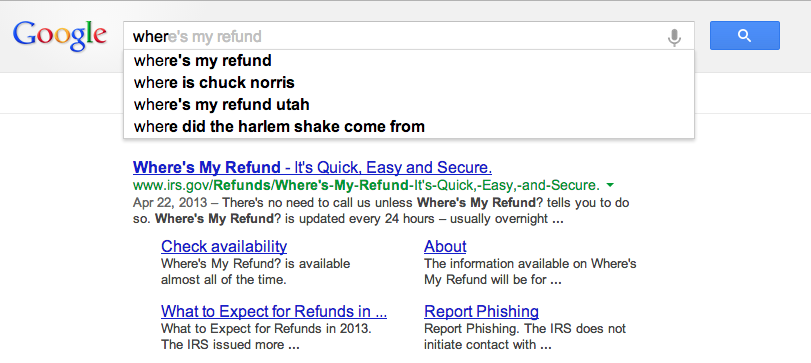


It is May 6, when i am writing this so you can see why the “Where’s my refund check,” may be the most frequently searched phrase. Popularity, within context, is one of the main reasons for the higher results, but Google asserts that all suggested results, impressions, are based upon ‘real-user searches.’ But i didn’t want to search for “Where’s my refund check,” but rather “where to buy Lime Green Jackets?” So did i just give an impression for “where’s my refund check?”


While a great example of instant searches,  let’s take another example of an instant product search. If you open up your browser to google.com and type in the “Nike air max 201” you will see a suggested list like 2013 and 2012, but what is really interesting are the results that are presented below. Remember, we haven’t hit enter yet, but our results are still being displayed. If you drop select the “2012” in the suggested list, you should get a result list like this:
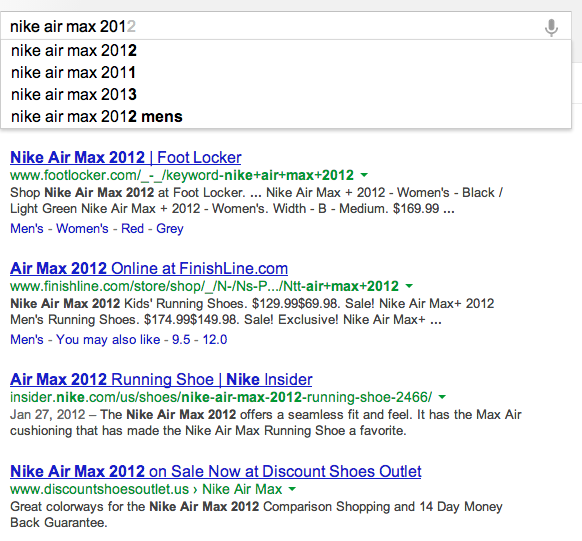
Any results that lists Nike in the domain is third in our organic searches list. Now instead of selecting the “2012” result in the search bar, select the “2013” and watch how your results differ. Now we see “nike” domain in the top slot. Is Nike paying extra for the keyword “2013” or is google instant search playing with things? If we just search for “nike air max”, Nike is the top two results. It is noteworthy, that is your were searching specifically for 2013 Nike Air Max shoes, you would have seen the results for the 2012 shoes first. Is this an incorrect impression?


After researching several sites, including Google, it is said the Google Instant will NOT be affecting your PPC data or your analytics data. Impressions, for instances, are only counted when a search term is clicked, the greyed suggested term is selected with an ‘enter’, or if you stop typing on a search query for more than three seconds. Google also believes, naturally, that instant search should actaully improve your impressions data over time because it will lead to less incorrect search or impressions, as users will see the results beforehand and be able to adjust their search terms appropriately. 

Seems like a reasonable way to ensure quality impression data, but where things may see a difference is in the AdWord campaign that you may be using. Google admits that your AdWord campaigns will need a tweak from your original campaign purchases. One thing that is always a question, is do you buy “hotel” or “hotels”? Before, you may have wanted to purchase “hotel” as it was shorter, but now it seems like Google Instant prefers “hotels” over “hotel” in the suggested 
results.

What is strange is that Google Trends shows that “hotel” is a much more frequently searched term than “hotels”.

So it would seem it is hard to pinpoint exactly which AdWord term would be a better fit. Of course, if you have the funds, you could always purchase both.


Throughout my research on this topic, the article by David Iwanow, on SearchEngineJournal.com was by far the most thorough. If you plan on reading more on this topic I highly recommend it. Link

So how does this change the way you prepare for your next campaign?


Tuesday, February 12, 2013

Google Secure Search, [not provided], and You

Back in May of 2010, Google announced that it would enable a feature known as “encrypted search” to prevent search terms from being included in the referral information to all web analytics programs.1  This was eventually modified to “secure search” and stretched to those who were logged into Google accounts.2  Then Firefox included it for all Google searches, as did iOS 6.3,4  And when version 25 of Google Chrome officially releases, it will even enable secure search for users searching directly from the address bar; they don’t even need to be on www.google.com.5

So, what does this “secure search” mean for analysts and online firms?  When secure search is enabled, any website clicked through Google is shown in web analytics programs as “www.google.com” and the search terms used to find that referral link are shown as [not provided].  Here is a snapshot of the search terms used for The Cultural Hall Podcast website when accessed through Google Analytics:


As you can see, over 36% of the search terms are disguised due to secure search.  To make matters worse, all mobile iOS 6 referrers don’t just leave out the search terms, but neglect to track the referral link at all.  Consequently, all traffic from these sources is being recorded as direct traffic.

It doesn’t seem that this trend is going anywhere any time soon.  Web optimization company Nine By Blue took a sample of several sites from different industries with different audiences, and looked at how searches resulting in [not provided] have changed over a one-year period.


Obviously this shrouded data is troubling for sites.  When search terms are mislabeled or misappropriated, it can make it more difficult to modify marketing campaigns and SEO practices.  But there is a solution.

Vanessa Fox,6 Contributing Editor at Search Engine Land and former Google employee, recently outlined a workaround to this new problem: Google Webmaster Tools.7  While Google does hide search terms that are sent through referrals to analytics programs, it still tracks those terms through its Webmaster Tools.  Not only that, but it also shows impression data, ranking, and click through rate for each separate term – information that your web analytics program likely is not giving you (at least not in the same format).

In addition to Google Webmaster Tools, it is important to note that search data is still available through paid search, such as Google Adwords.  Secure search is also Google-specific, so all referrals from Bing, Yahoo! and other search engines are still arriving unfiltered and uncompromised.

While the increasing trend of [not provided] data is worrisome, Fox notes that focusing on the problem is not the answer.  Companies need to start adapting now, analyzing and modifying their processes to try and glean the same insights they would from search terms using different methods, such as Webmaster Tools or implementing paid search.


1. Roseman, Evan. "Search more securely with encrypted Google web search." Google Blog. Google, 21 May 2010. 12 Feb. 2013.↩
2. Sullivan, Danny. "Google To Begin Encrypting Searches & Outbound Clicks By Default With SSL Search." Search Engine Land. Search Engine Land, 18 Oct. 2011. 12 Feb. 2013.↩
3. Sullivan, Danny. "Firefox 14 Now Encrypts Google Searches, But Search Terms Still Will “Leak” Out." Search Engine Land. Search Engine Land, 17 July 2012. 12 Feb. 2013.↩
4. Sullivan, Danny. "How An iOS 6 Change Makes It Seem Like Google Traffic From Safari Has Disappeared." Search Engine Land. Search Engine Land, 1 Oct. 2012. 12 Feb. 2013.↩
5. Langley, Adam. "Google Search in Chrome gets more secure." The Chromium Blog. Google, 18 Jan. 2013. 12 Feb. 2013.↩
6. Search Engine Land. "Search Engine Land Contributors - Vanessa Fox." Search Engine Lane. Search Engine Land, 2013. 12 Feb. 2013.↩
7. Fox, Vanessa. "Will [Not Provided] Ever Reach 100% In Web Analytics?." Search Engine Lane. Search Engine Land, 18 Jan. 2013. 12 Feb. 2013.↩